Search Jobs with ChatGPT
- Add one link as a plugin, no API key
- Search 6 million+ jobs by asking in plain English
- Every job links to the company's own post
Searching from AI agents is part of the paid plan.
How do I connect JobUnlocked to ChatGPT?
Open Plugins in ChatGPT, click Add, then Add custom MCP server, and paste the JobUnlocked link. You sign in with your JobUnlocked account, so there is no API key to copy and nothing to install.
Add JobUnlocked to ChatGPT
In ChatGPT, open Plugins → Add → Add custom MCP server and paste this link.
https://mcp.jobunlocked.com/mcp
No API key needed: keep Authentication set to OAuth and sign in to JobUnlocked when ChatGPT asks you to approve access. Custom MCP servers are available on paid ChatGPT plans on the web.
- 1 Copy the JobUnlocked link above.
- 2 In ChatGPT on the web, open Plugins in the sidebar, click Add, then Add custom MCP server.
- 3 Name it JobUnlocked, paste the link and keep Authentication on OAuth.
- 4 Tick I understand, click Create as a plugin, then sign in to JobUnlocked and click Allow.
Then just ask ChatGPT
Once connected, ChatGPT calls the JobUnlocked tools and gives you each job with the company's apply link.
Also try
- Which warehouse jobs near Dallas pay more than $20 an hour?
- Shortlist five remote accounting jobs and tell me which needs a CPA
- Open the second job and summarise what they want in five bullets
What it looks like in ChatGPT
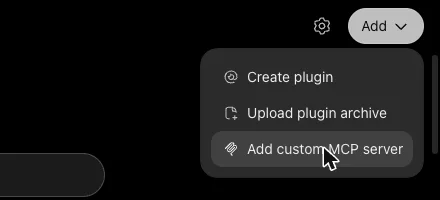
1 Open Plugins, click Add, then Add custom MCP server.
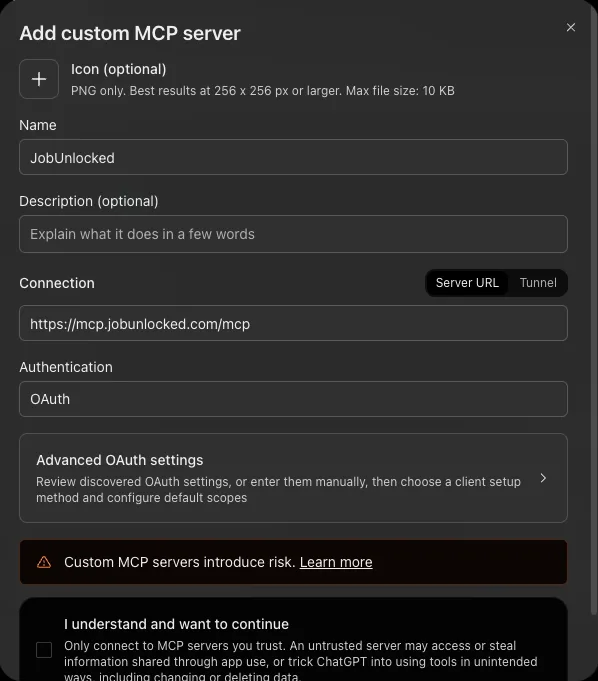
2 Name it JobUnlocked, paste the link and keep Authentication on OAuth.
Which way should I connect ChatGPT?
Both search the same jobs and need no API key. Use the first unless you have a reason not to.
| Way | How you connect | Sign-in | Best for |
|---|---|---|---|
| Custom MCP server | Plugins → Add → Add custom MCP server | Your JobUnlocked account, no API key | ChatGPT on the web and the desktop app |
| Codex | codex mcp add in your terminal | Your JobUnlocked account, no API key | Developers who use OpenAI's coding agent |
What can ChatGPT do with JobUnlocked?
ChatGPT can search open jobs, filter them and read each one in full, through the JobUnlocked tools it finds once you connect.
Just ask in plain English
Tell ChatGPT the job, the city and the pay you want. It turns that into the right filters and searches for you.
6 million+ open jobs
ChatGPT searches the same jobs you see on JobUnlocked, from 400,000+ company websites around the world.
Straight from the company
Every result links to the company's own job post, so you apply directly with the employer, not through a job board.
Real filters
ChatGPT can use every filter on JobUnlocked: location, remote, pay, date posted, job type, seniority, skills, shifts, benefits and no degree needed.
Full job details
ChatGPT can open any job and read the whole description, pay, skills and benefits before you decide.
Read-only and private
ChatGPT can only search and read jobs. It can't see your resume, saved jobs, email or billing details.
What is the JobUnlocked MCP?
The JobUnlocked MCP server is the link that lets ChatGPT search jobs for you. MCP (Model Context Protocol) is the standard way AI agents plug into the apps you use. It gives ChatGPT JobUnlocked's job search as tools, so it can find and read jobs without you opening a browser.
How ChatGPT uses JobUnlocked
- Connect JobUnlocked in ChatGPT with the link
- ChatGPT finds the JobUnlocked tools on its own
- It turns your request into search filters
- It reads the jobs that fit and keeps the apply links
- You apply on the company's own job post
Name: JobUnlocked
URL: https://mcp.jobunlocked.com/mcp
Sign-in: your JobUnlocked account

# Tools ChatGPT finds on its own:
# - search_jobs: find open jobs with every search filter
# - count_jobs: totals and which cities, skills and companies exist
# - get_job: read one job in full
# - get_company: what a company does and its open jobs
# - pay_by_level: average pay by seniority
What can you ask ChatGPT?
Anything you'd ask a friend helping you job hunt: the role, the city, how recent and the pay. No commands needed.
- Job search
Find fresh jobs
"Find entry level marketing jobs in Seattle posted in the last 3 days"
- Pay
Filter by pay
"Which warehouse jobs near Dallas pay more than $20 an hour?"
- Shortlist
Compare a few
"Shortlist five remote accounting jobs and tell me which needs a CPA"
- Read
Read one in full
"Open the second job and summarise what they want in five bullets"
Which jobs can ChatGPT search?
Every kind of job on JobUnlocked, from software and AI to nursing, retail and the trades, in countries around the world.
- Software engineering
- Backend
- Frontend
- Data and analytics
- AI and machine learning
- DevOps and SRE
- Security
- Product and design
- Nursing and healthcare
- Sales
- Marketing
- Customer support
- Finance and accounting
- Retail
- Hospitality
- Warehouse and logistics
- Skilled trades
- Education
Is ChatGPT the same as Codex?
No. ChatGPT is OpenAI's chat assistant and connects to JobUnlocked as a custom MCP server. Codex is OpenAI's coding agent for the terminal and editor, and connects with codex mcp add.
| ChatGPT | Codex | |
|---|---|---|
| What it is | OpenAI's chat assistant on chatgpt.com and its apps | OpenAI's coding agent in your terminal and editor |
| How JobUnlocked connects | Custom MCP server with the JobUnlocked link | codex mcp add, then codex mcp login |
| Best for | Searching and comparing jobs by conversation | Saving shortlists to files while you code |
Tips for ChatGPT
- 1 Start your message with: use JobUnlocked to... so ChatGPT knows to use it.
- 2 Say the city, how recent and the pay you want in one message. ChatGPT turns them into filters.
- 3 Ask ChatGPT to keep both links for each job: the company's post and the JobUnlocked page.
Other AI agents that search with JobUnlocked
Questions about ChatGPT and JobUnlocked
Contact usLet ChatGPT find your next job
Connect JobUnlocked to ChatGPT and search jobs from company websites just by asking.